

The Best Prepaid Card for Tourists in South Korea (2025 Guide)

Updated: Nov 13, 2025
If you are visiting South Korea, a prepaid travel card can streamline your entire trip. Instead of juggling cash, multiple cards and different transport passes, you load one card and use it across the country for transport, dining, shopping and more. Korea Travel Card, WOWPASS and HANPASS are the three dominant players shaping the visitor payment landscape. Each delivers strong value but with different operational strengths.
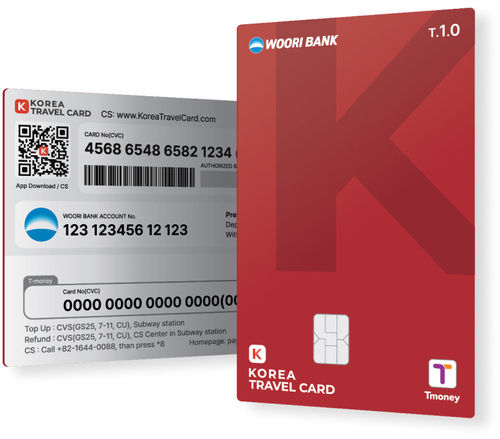
1. Korea Travel Card
The Korea Travel Card is a prepaid IC-chip card issued by Woori Bank and managed by Hana Bank, combining secure fund management with wide usability.
Key Features:
Nationwide Transport Access: Works on buses, subways, taxis, airport limousines, KTX and other national trains, express buses, and toll gates.
Widespread Payments: Accepted at over 5 million retailers nationwide through the Hana Card network.
Secure Funds: Your balance is protected by Hana Bank, and you can withdraw cash from over 3,700 Woori Bank ATMs.
Simple Top-Up Anytime, Anywhere: add funds wherever it’s convenient: airport bank counters, currency exchange offices, convenience stores, kiosks, or instantly through the mobile app.
Reload Options: Top up at convenience stores (CU, GS25, 7-Eleven), kiosks, subway terminals, or through the official app.
No Deposit Fees: when you load money at Woori Bank, there are absolutely no charges. On arrival in Korea, you can exchange your currency at Woori Bank in the airport at an excellent rate and deposit it to your card with zero commission. Powered by the Hana Card network, the Korea Travel Card lets you make payments anywhere in the country without extra fees.
Cashback & Perks: 0.2% cashback on all purchases, up to 50% at partner stores, plus special booking and dining discounts.
Easy Pickup: Available at Incheon Airport (T1 & T2), Jeju City, and Gimhae Airport in Busan.
App Integration: Activate and manage your card via the Korea Travel Card App.
Pick up Location
1. Incheon International Airport Terminal 1 (1F Public Area)
Near Gate 6 | 06:00 - 22:00
Near Gate 11 | 06:00 - 22:00
B1 East Side Woori Bank Branch | 09:00 - 16:00
2. Incheon International Airport Terminal 2 (1F Public Area)
Near Gate 7 | 06:00 - 22:00
B1 East Side Woori Bank Branch | 09:00 - 16:00
3. Jeju Downtown
Visit Moneybox Currency Exchange Office Jeju Branch | 10:00 - 21:00
Location: #102, 1F, Wonnohyeong 4-gil 1, Jeju-si
4. Gimhae International Airport
Visit Moneybox Currency Exchange Office Gimhae Airport Branch | 06:00 - 21:00
Location: 1F Waiting Area, Gimhae Airport Station (Busan-Gimhae Light Rail Transit)
How to Use the Korea Travel Card
Purchase your card for your preferred date and choose your pick-up date.
Check your voucher – it will be sent via email or mobile.
The email will include a serial number (25 characters, starting with “KTC_Travolution”) required to issue your Korea Travel Card.
If you don’t see the voucher, check your spam folder or contact customer service.
Install the Korea Travel Card app.
In the app, enter the serial number in the Promotion Code field. This will generate a voucher for collecting your physical card.
Go to the designated pick-up location and present your voucher.
Receive your physical card and register it in the app.
You’re ready to start using the card for transportation and payments.
Credit: Korea Travel Card
Using the Card After Issuance: App Guide
Download the Korea Travel Card app and complete membership registration (email verification required).
From the card type list, select the version that matches the design on the back of your card (e.g., A Type-V CARD).
On the Home screen, tap “Register Card” and ensure the app successfully recognizes it.
Add Funds (Top-Up)
Payment Balance: Recharge via the app, banks, currency exchange offices, convenience stores, or kiosks.
Transportation Balance: Add funds at subway charging machines or convenience stores.
Credit: Korea Travel Card
Notice
(For foreign tourists only)
Once your payment for the Korea Travel Card is complete, a QR code voucher will be sent to your email. This voucher is required to issue your card.
Please ensure you enter a valid email address.
Actual products or services may differ slightly from the photos shown.
This offer cannot be combined with other events, promotions, or coupons.
Operating hours may vary depending on government social distancing guidelines. Please check with the location before visiting.
After your reservation is confirmed, the voucher will be sent to the mobile number or email you provided.
If you do not receive the confirmation voucher, check your spam folder or contact the customer service center.
RED TABLE CS Center
Phone: 02-6964-7958
Business hours: Monday–Friday, 9:00–18:00 (KST)
Closed on public holidays
For order or reservation inquiries, please contact the CS center directly.
Purchase the card online at: Klook, SeoulPass, Ctrip, Red Table Check it here
For more information check the official website: https://koreatravelcard.com/
Download App Below


2. WOWPASS
The WOWPASS is designed for flexibility, especially for travelers who want to top up in multiple currencies and get better exchange rates than airports.
Key Features:
Multi-Currency Top-Up: Load funds in up to 16 currencies via app or kiosk, with no top-up fees and competitive rates.
Transport & Shopping: Works like a T-money card for buses, subways, taxis, and AREX, and can be used for in-store payments anywhere local cards are accepted.
Top-Up & Withdrawal: Recharge through the app or at over 307 kiosks nationwide. Withdraw up to 100,000 KRW per transaction from WOWPASS machines (1,000 KRW fee). Find them at the airport and Subways stations.
Refund & Reissue: Unused balance refunded for free at airports; lost cards can be reissued for 3,000 KRW.
Smart App Features: Real-time balance, transaction history, pause/loss protection, peer-to-peer transfers, and cashback (≈0.5%).
Wide Availability: Pick up from self-service kiosks at airports, subway stations, tourist spots, and hotels.
Credit: Seoul Travel Pass
Withdrawing Your WOWPASS Balance
You can withdraw your remaining balance in Korean won at any WOWPASS machine.
Limit: Up to ₩100,000 per transaction
Fee: ₩1,000 per withdrawal
Steps:
Locate the nearest WOWPASS machine.
On the screen, select: Language → WOWPASS Card → Withdraw Cash.
Insert your WOWPASS card.
Follow the on-screen instructions to verify your PIN via the WOWPASS app.
Choose your withdrawal amount.
Collect your cash.
Credit: Seoul Travel Pass
Where WOWPASS Cannot Be Used
Online or mobile app payments (e.g., food delivery apps) – short-term foreign visitors in Korea face restrictions on online transactions.
Cash-only businesses such as street food stalls, traditional markets, or underground shopping arcades.
KTX transactions over ₩50,000: these require a PIN, which WOWPASS does not support.
Notice
※ WOWPASS is not available for purchase or use by Korean nationals.
The WOWPASS card can be used only at offline stores in South Korea.
The transportation balance (T-money) cannot be loaded with foreign currency. It must be topped up with Korean won (KRW) cash at subway machines or convenience stores.
If you need KRW cash, withdrawals are available at WOWPASS machines.
Note: Machines at Incheon International Airport do not support withdrawals. Instead, they provide a preloaded transportation balance of ₩10,000.
The WOWPASS machine at Incheon International Airport does not support KRW withdrawals, card reissue, or cash exchange.
Maximum foreign currency top-up per day: ₩2,000,000.
Maximum top-up per week: ₩10,000,000.
Card balance withdrawal fee: ₩1,000.
Card reissue fee: ₩3,000.
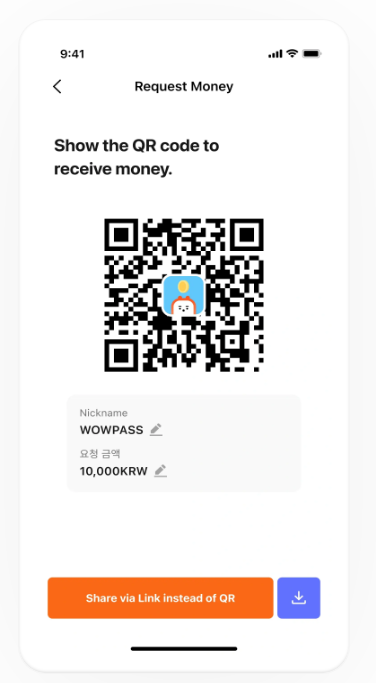
You can transfer between friends using the QR code on the app!
Card Validity Period
Card: Valid for 6 years from the date of issuance.
Balance: Remains valid for 6 years from the most recent recharge.
If your card expires, you can still access any remaining balance by requesting a reissued card.
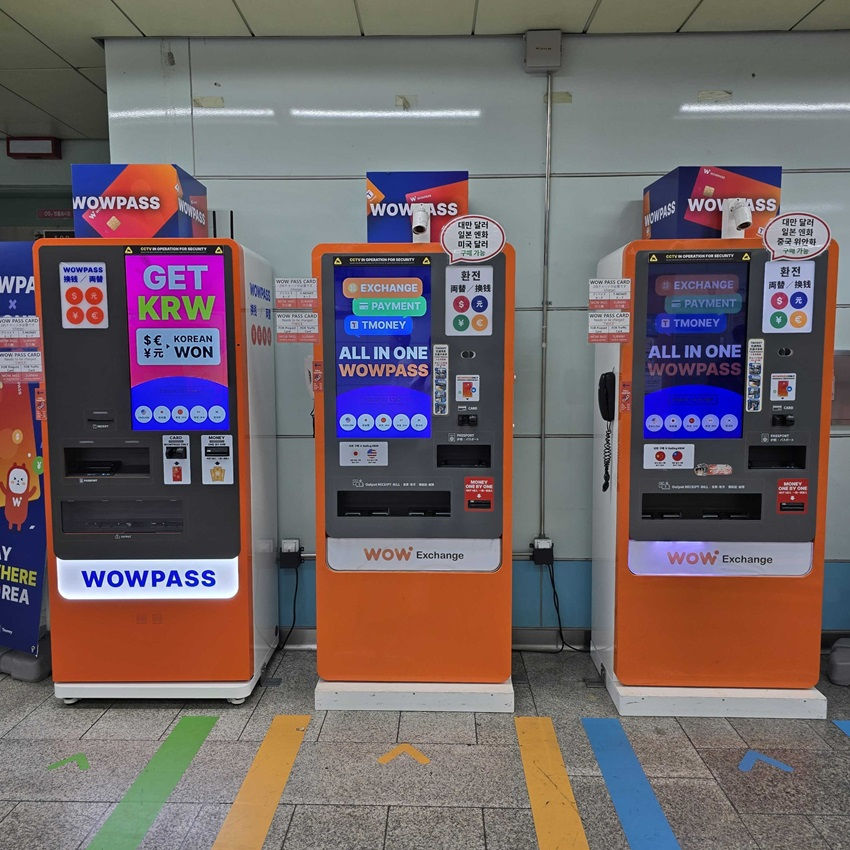
You can find a WOW Pass machine here.
You can easily pick up and purchase your WOWPASS from more than 300 self-service kiosks located across South Korea, including in hotels, convenience stores, subway stations, and popular tourist areas.
Major Pickup Locations:
Incheon International Airport: Terminal 1 & Terminal 2
Gimpo International Airport
Jeju International Airport
Gimhae International Airport (Busan)
Daegu International Airport
Other Ports: Incheon Port, Busan Port
For more information check the official website: https://www.wowpass.io/
Download App Below

3. HANPASS Travel Card
A digital forward prepaid solution built for travelers who want strong exchange rates, mobile first control and frictionless transport access
HANPASS is a licensed global remittance and foreign exchange platform that expanded into travel card services for visitors in Korea. It operates as an app based prepaid card with stable KRW spending, competitive FX and full T money transport integration once activated.
Key Features
• Strong FX Rates through HANPASS’s proprietary foreign exchange engine that often outperforms airport counters and convenience store kiosks
• Digital Issuance with instant setup inside the HANPASS app without paperwork
• Integrated T Money Transport allowing the card to function on buses, subways, taxis and AREX after linking the transport balance in the app
• Wide Merchant Acceptance for offline stores nationwide through the Hana Card payment network
• Multi Currency Top Ups supported in the app with transparent real time conversion and no hidden fees
• ATM Withdrawals available through partnered ATMs with KRW cash-out options depending on user verification level
• International Remittance Built In for travelers who need to send money overseas from the same wallet
• Security Focused Architecture with biometric authentication, encrypted card controls and remote freeze options
Pickup and Issuance
• Issued directly through the HANPASS app
• No physical store visit required
• Digital card available immediately after registration
• Physical card pickup available at designated HANPASS partner counters and convenience locations depending on the current service rollout
Select a pickup date
Please select a specific date for card pickup, as you can only receive your card on the reserved date.
2. Select a pickup location
Choose your desired pickup location (KT Roaming Center or CU Convenience Store).
If you pick up at the KT Roaming Center, you are required to purchase a KT USIM or KT eSIM.
At CU Convenience Stores, you can collect the card without needing to buy a SIM card.
3. After purchase, your order is immediately confirmed, and a PDF voucher will be issued.
4. Click the QR code or URL in the voucher to download the 'Hanpass' app.
Be sure to download the 'HANPASS' app using the QR code or URL provided in the voucher. If you download the app manually, you will not be eligible for Creatrip buyer promotions or benefits.
5. Please follow the steps to complete the registration. When signing up, make sure to check "Signed up for a Korea trip."
Please select the exact location where you will pick up the card.
Incheon Airport Terminal 1 (T1)
Incheon Airport Terminal 2 (T2)
Gimpo International Airport
Gimhae International Airport
Busan Port International Passenger Terminal
CU Incheon International Airport Branch 4 (T1)
Address: Terminal 1, International Arrivals F, Left Side
Hours: 00:00~24:00 (Open 24/7, No holidays)
(Note: HANPASS frequently expands pickup points. Updated lists are available inside the app.)

Credit: Creatrip
Credit: Creatrip
Top Up Options
• Multiple foreign currencies
• Real time conversion in the app
• Debit or credit card top ups depending on issuing country
• Bank transfer top ups supported for select regions
Transport Usage
Once T money activation is completed, HANPASS supports:
• Buses
• Subways
• Taxis
• AREX airport express
• Rechargeable transport balance through subway charging machines or convenience stores
Cash Withdrawal
• Supported at partner ATMs depending on verification
• KRW withdrawals only
• Standard ATM withdrawal fee applies
• Daily and monthly limits depend on user verification tier
Refund Policy
• Balance refunds available directly through the app
• Refund processing times vary by payment method
• No penalty for maintaining a low balance
• Card validity and balance validity both extend with continued use
Card Validity
• The digital card remains valid as long as the account is active
• Physical card (if issued) is typically valid for multiple years depending on the batch release
• Balances remain active and do not expire as long as periodic usage continues
Who Should Use HANPASS
• Travelers who want market leading exchange rates
• Visitors who expect to spend across both retail and transit systems
• Digital first users who prefer to manage everything on their phone
• Long stay travelers or students who want a semi banking experience without opening a Korean bank account
• People who need overseas remittances during their trip
For more information check the official website: https://www.hanpass.com/en
Use Creatrip for easy access: https://creatrip.com/en/spot/14352
Multilingual Customer Center | Operating Hours: Weekdays, Weekends 09:00~18:00 / Closed on South Korean public holidays Main Number: 02-3409-1540 KakaoTalk: Chat Consultation Customer Center Email: contact@hanpass.com |
Download App Below
Quick Comparison Table
Feature | Korea Travel Card | WOWPASS | HANPASS |
Top-Up Methods | Convenience stores, kiosks, app; KRW only | App (16 currencies), kiosks, better rates | Multi currency in app with strong FX |
Transport Coverage | Nationwide incl. trains | Full T-money network incl. AREX | T money compatibility after linking |
Cashback | 0.2% + partner perks | ≈0.5% + brand discounts | Varies by merchant and campaign |
Cash Withdrawal | Woori ATMs | WOWPASS machines (fee applies) | Partner ATMs depending on verification |
Refunds | Not clearly advertised | Free refunds at airports | App based refund depending on balance rules |
Pick-Up Locations | Airport counters, Jeju, Busan | Kiosks at airports, stations, hotels | Digital issuance through app |
Which One Should You Choose
Choose Korea Travel Card if you want a secure, banking backed ecosystem with stable KRW usage, traditional card reliability and nationwide transport by default.
Choose WOWPASS if you want competitive exchange rates, multi currency top ups, kiosk convenience and a simple visitor centric experience.
Choose HANPASS if you want the strongest FX value, digital centric payments, international remittance options and banking functions inside one mobile platform.
All three options reduce friction, speed up travel and support a cash light trip across Korea. The right choice depends on whether you prefer the certainty of local banking, the convenience of kiosk automation or the efficiency of a global FX platform.


Very comprehensive review. Thank you very much.